Hand2Note (v4) — Full Review
Overview
Hand2Note has become one of the most talked-about poker tracking tools in the professional online poker world. With its dynamic HUD, real-time player profiling, population tendencies, advanced filtering options, and extremely powerful database engine, Hand2Note has positioned itself as the go-to software for serious grinders who want maximum data depth and customization. While tools like PokerTracker 4 and Holdem Manager 3 remain excellent, Hand2Note is widely considered the next evolution in poker analysis technologies thanks to its modern architecture, customizable interface, and solver-like statistical modeling.
In this full Hand2Note review, we cover everything from HUD functionality, database speed, features, supported sites, analytics, pricing, pros, cons, and who this software is truly meant for. This review follows the same structure as our PokerTracker 4 and Holdem Manager 3 reviews, ensuring full consistency for your website.
Quick Verdict
Hand2Note stands out as the most advanced poker tracking and HUD tool available today for serious online grinders. Its dynamic HUD, population reports, and high-speed database engine set a new standard for professional poker study and in-game decision making.
Exclusive: Get 10% off via ProRakeback with code H2NPRB.

Pros
- Most advanced HUD system available
- Context-aware dynamic HUDs for real-time advantage
- Strongest population analysis tools in the industry
- Very fast database engine for high-volume players
- Deep customization for HUDs, reports, filters, and visuals
- Great for technical and solver-oriented study
- Ideal for creating pool-based exploit strategies
- Clean, modern, and visually appealing interface
- Perfect for serious grinders, professionals, and analysts
Cons
- Steeper learning curve than PT4 or HM3
- Requires time to configure advanced HUDs
- Some site restrictions depending on network rules
- Subscription model may be expensive for casual users
- Not beginner-friendly without prior HUD experience
Hand2Note Overall Rating
What Is Hand2Note?
Hand2Note is a comprehensive poker database tracker and HUD software used by professional online players to analyze their hands, monitor their performance, build opponent profiles, and optimize decision-making both in real time and during study sessions. Unlike traditional trackers that rely mostly on static HUDs and pre-built reports, Hand2Note focuses heavily on dynamic in-game statistics, context-aware data, population analysis, and highly customizable reports.
The software is designed for players who want an edge through advanced statistical insights, deeper understanding of opponents’ tendencies, and exceptionally fast data processing. Hand2Note is widely used among high-volume grinders, GTO-focused players, and those who rely on population exploits to maximize expected value.
HUD Features & Customization
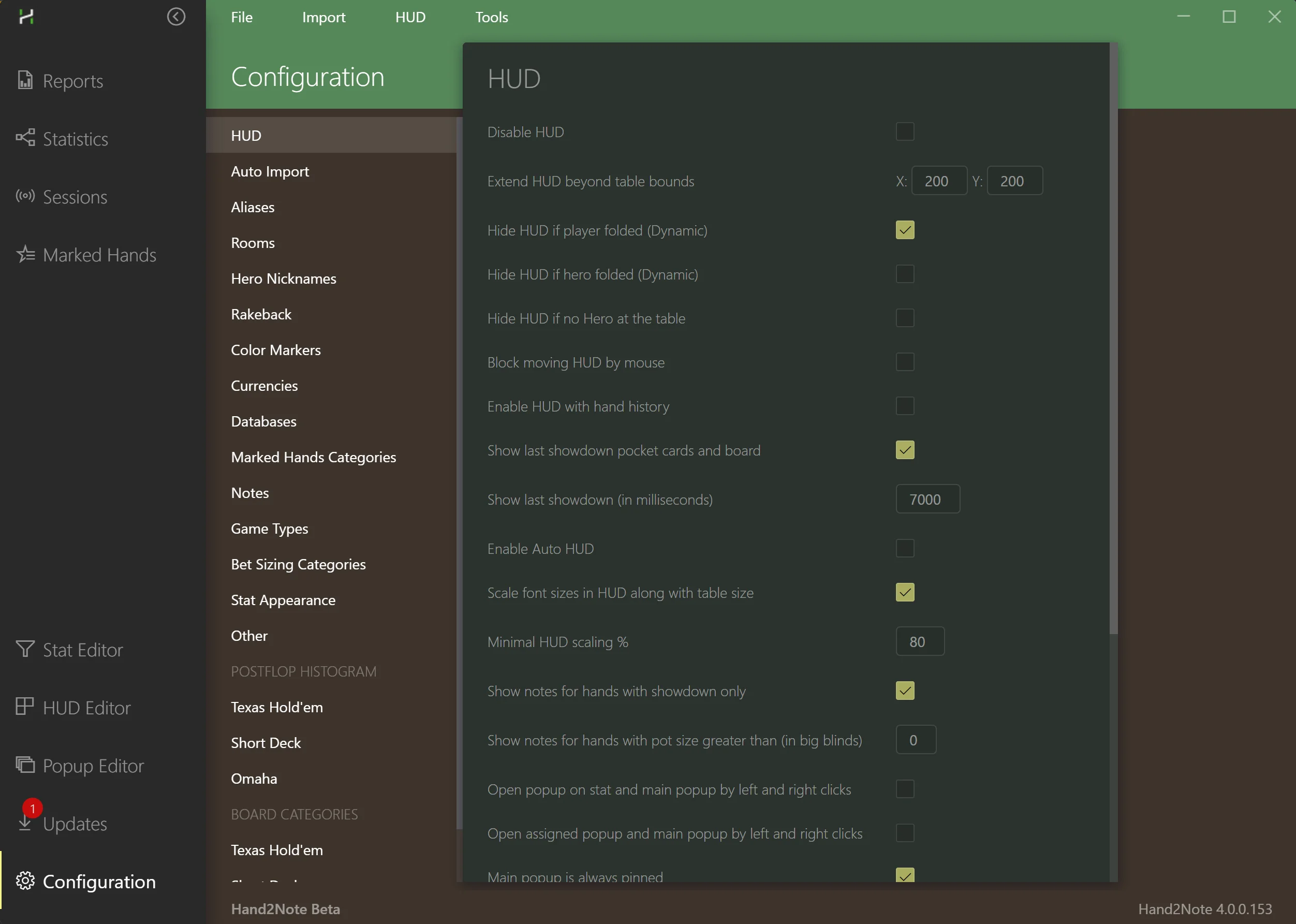
One of the core reasons Hand2Note stands out is its HUD system. While PokerTracker 4 and Holdem Manager 3 use primarily static HUDs, Hand2Note’s HUD is dynamic. That means the stats displayed on-screen automatically change depending on the situation, stack depth, positions of the players, and other relevant factors.
- Flop, turn, river situations
- Stack size ranges
- Effective stack depth
- Table position
- Player type
- Preflop actions
- Bet sizing tendencies
- Blind vs blind situations
- Multiway vs heads-up
This level of depth enables players to make significantly more accurate decisions based on real-time opponent behavior. Advanced HUD users can also build visually rich panels with color coding, heat maps, pop-up ranges, and GTO-based frequency highlights.
Database, Performance & Speed
Another major strength of Hand2Note is its high-performance database engine. Traditional trackers can slow down when storing millions of hands, but Hand2Note is engineered to handle massive databases with smooth efficiency.
- Lightning-fast import speeds
- Smooth real-time HUD rendering
- Instant filtering even on millions of hands
- Seamless multi-table performance
- Advanced memory optimization
- Minimal lag with large databases
- Mass data processing for population reports
Advanced Reporting & Population Analysis
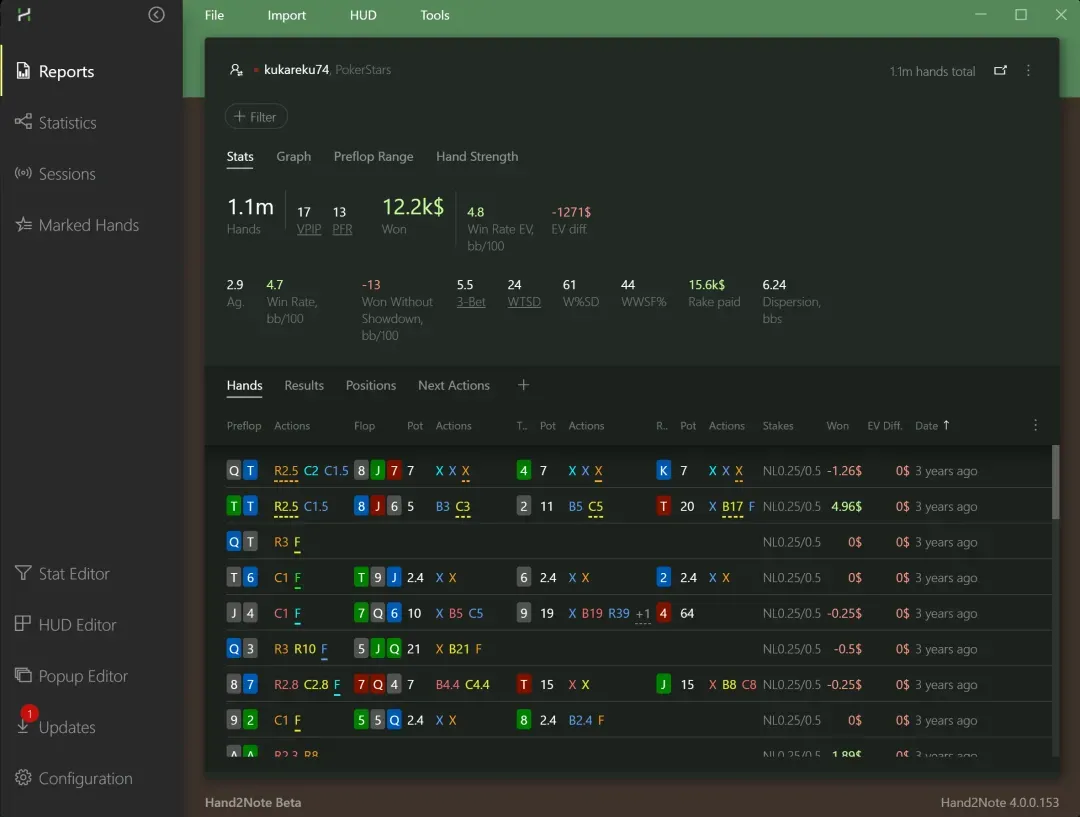
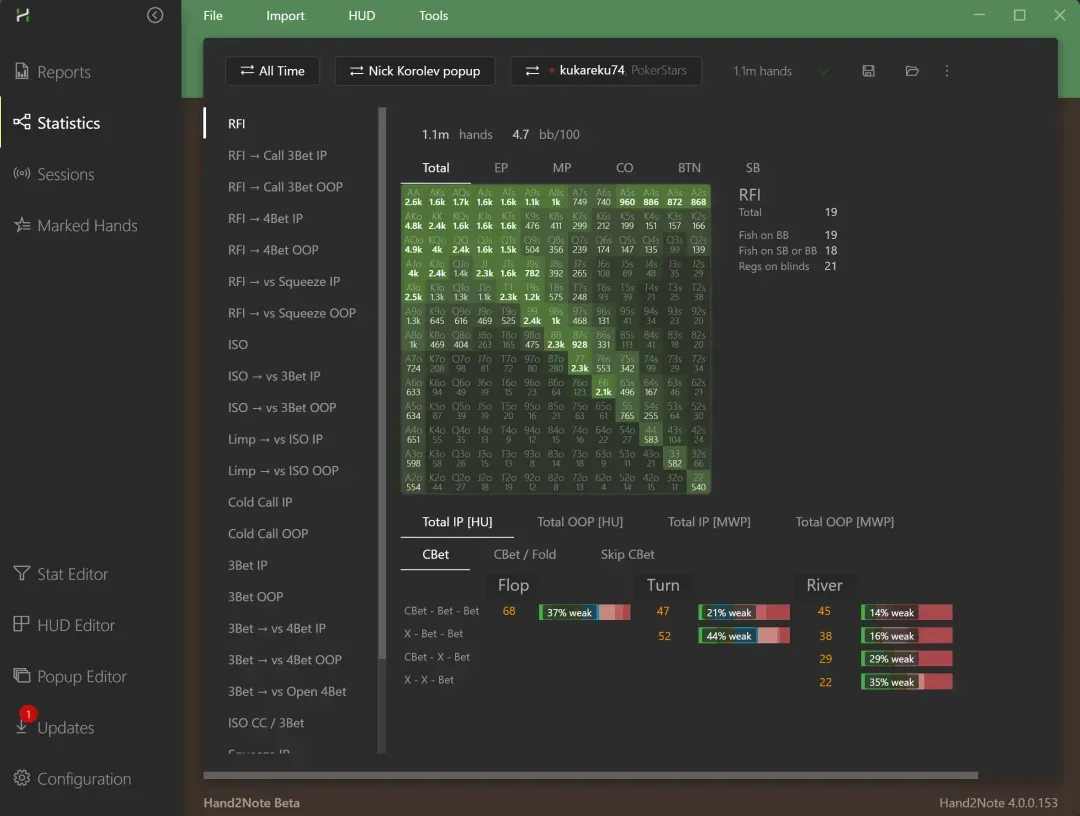
Hand2Note’s reporting capabilities are one of the main reasons advanced players choose it over other trackers. The software offers several reporting layers that go far beyond simple win-rate tracking or basic filters.
- Custom reports across any parameter combination
- Detailed positional breakdowns
- Bet sizing frequency charts
- Range heat maps
- GTO frequency comparisons
- Player-specific profiling
- Pool-wide population tendencies
- Exploit spot identification
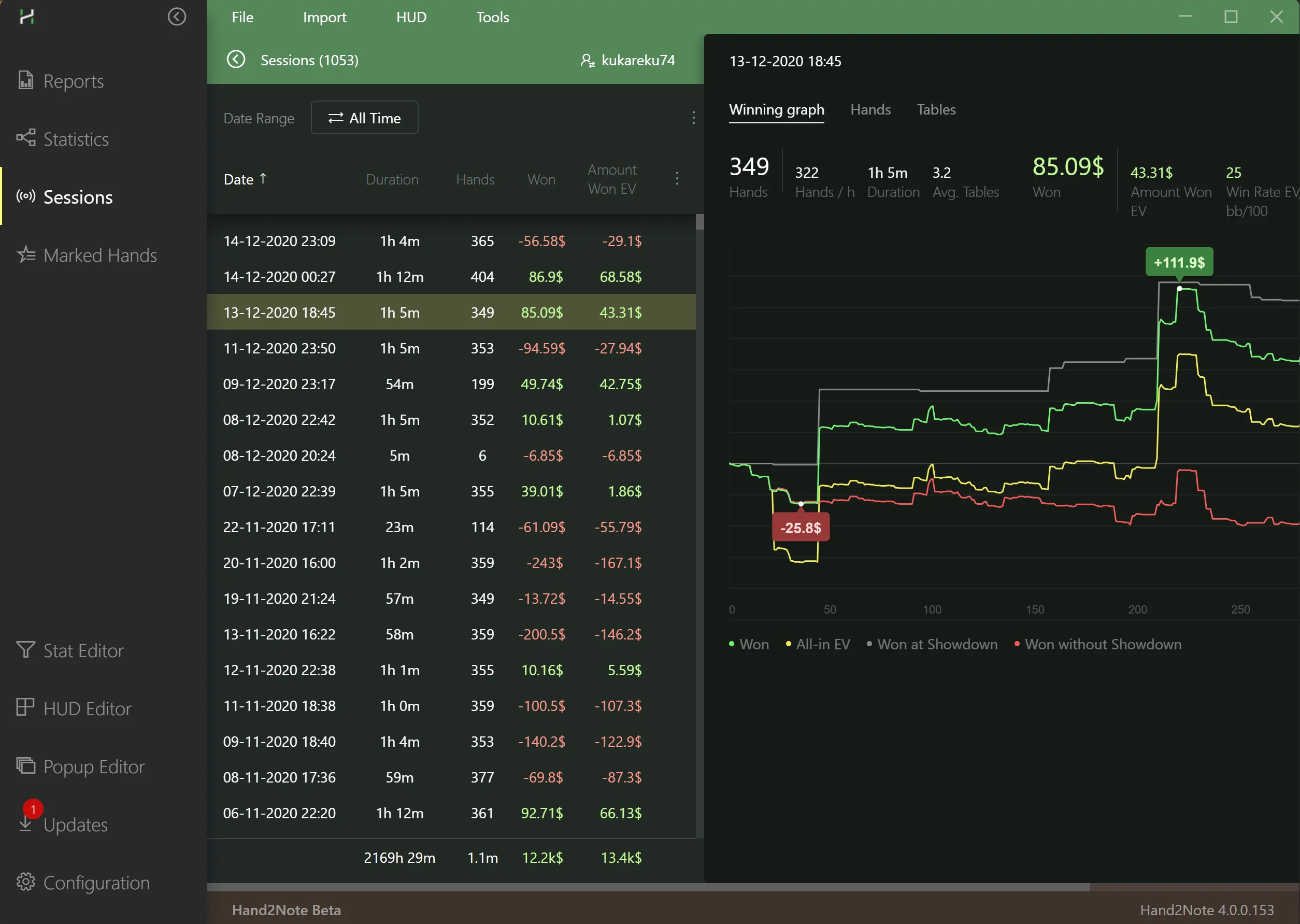
- Session summaries and leak-finding reports
- HUD pop-ups with linked charts and visuals
Population reports are particularly valuable for players who aim to exploit tendencies across entire pools rather than just individual opponents.

Interface & Ease of Use
Hand2Note’s interface is clean, modern, and highly customizable, but it is more technical than other trackers. While beginners may find PokerTracker and Holdem Manager easier to operate at first glance, Hand2Note rewards players who take the time to learn its layout and customization tools.
- Modular layout with dockable sections
- Clean visual design built for long study sessions
- Easy integration with population reports
- Smooth navigation through custom-created filters
- Fast access to HUD editing tools
- Real-time coloring and stat visualization
Game Support & Formats
Hand2Note supports cash games and tournaments across major networks and many independent rooms. It excels in environments where detailed hand histories are available and HUDs are permitted by site policy.
- Cash games (6-max, full-ring, heads-up)
- MTTs and SNGs with stack-depth-aware stats
- Fast-fold formats where HUD legality allows
- Jackpot/Spin formats with specialized reporting
Always verify HUD policy and current supported rooms before long sessions, particularly after client updates.
Multi-Site Support
Hand2Note supports a wide range of poker rooms across major networks, with real-time HUDs on all supported sites depending on network rules. Some poker rooms may limit HUDs due to internal policies, but within the allowed markets, Hand2Note remains one of the most widely compatible tracking tools.
Supported room types include major global networks, popular Asian apps (where allowed), independent rooms with accessible hand histories, and sites with local regulation that permits tracking tools. Compatibility varies by region and room policy, but in general, Hand2Note remains extremely flexible for multi-site grinders.

Mac Support & Emulation
Hand2Note provides macOS builds alongside Windows. Feature parity can vary by room and client version. For mobile-app ecosystems, many players use Android emulators with clear setup guides.
- macOS builds for Intel and Apple Silicon
- Windows remains the most complete experience
- Emulator-based HUDs for permitted mobile apps
- Regularly check documentation after client updates
If you play primarily on Mac, confirm your target rooms and plan a stable configuration before high-volume grinding.
Is Hand2Note Safe & Legit?
Yes—when used within site rules and supported-room guidelines. Hand2Note relies on hand histories, local processing, and HUDs only where permitted. As with any tracker, compliance with operators and regional policy is essential.
- Reads hand histories and stores them locally
- No prohibited memory scraping of poker clients
- HUDs displayed only on rooms that allow them
- Configurable to match room and jurisdiction requirements
Always review the current supported-room documentation and your site’s third‑party tool policy.
Workflow
If you enjoy building tools as much as using them, Hand2Note shines. Start simple, then layer dynamic elements and expression stats. For mobile-app rooms, Hand2Note supports HUDs via Android emulators with clear guides.
Setup Best Practices
- Begin with a lean HUD, then add depth gradually
- Use consistent color coding for faster reads
- Group stats by node (preflop, flop, turn, river)
- Tag hands and add notes during cool-down periods
- Schedule weekly population-report reviews
- Archive old databases to keep performance snappy
This approach keeps the interface fast, reduces noise, and ensures your HUD communicates only the most actionable information at the table.
Common Pitfalls & How to Avoid Them
- Overloading the HUD with rarely used stats
- Ignoring site HUD policies and supported-room lists
- Forgetting to recalibrate after client updates
- Running broad filters on massive DBs during play
- Skipping routine backups and index maintenance
Keep your setup modular, verify room support often, and adopt a maintenance routine to preserve speed and reliability.
Getting Started Checklist
- Install the latest Hand2Note build for your OS
- Verify your rooms in the supported‑site list
- Create a lean HUD with core preflop/postflop stats
- Import a sample of hands and validate reports
- Configure tags, notes, and color rules
- Schedule weekly study blocks using population reports
- Back up your database and export key profiles
This checklist ensures a clean, reliable baseline before you scale up complexity.
Data Hygiene & Performance Tuning
Large databases demand discipline. Archive ancient data, rebuild indexes periodically, and avoid running heavy analytical filters while playing. Keep HUDs lightweight and move deep analysis to post‑session.
- Rotate archives for old hand histories
- Rebuild indexes after major imports
- Use saved filters instead of ad‑hoc mega queries
- Profile slow operations and simplify where possible
These habits maintain Hand2Note’s hallmark speed and prevent friction during long grinds.
Study Tools & GTO Support
- GTO-based stat frequency comparisons
- Range visualization and structure analysis
- Line-by-line exploit identification
- Bet size frequency mapping
- Real-time stat evaluation based on solver ranges
These tools make Hand2Note a strong companion to solvers as players can match their database tendencies to optimal play and quickly identify deviations.

Room Coverage & Converters
Room coverage evolves with client updates and regional policies. Where hand histories are limited or HUDs restricted, converters and supported-emulator workflows can bridge the gap if permitted by local rules.
- Check the official supported-room list before sessions
- Use converters only where compliant and permitted
- Re-test HUD stability after each room update
Compliance matters. Keep your configuration aligned with site rules and your jurisdiction.
Pricing & Value
Hand2Note uses a subscription model with multiple tiers, including options for basic tracking, advanced HUDs, and population analysis. For players who only need simple tracking and standard HUDs, PokerTracker and Holdem Manager may offer better cost efficiency. For advanced grinders who want maximum data depth, Hand2Note’s price is justified by its capabilities.
Many high-stakes and mid-stakes regulars consider Hand2Note essential to their long-term EV, especially for generating exploitative strategies through population data.
Support & Community
Hand2Note maintains active documentation, changelogs, and support channels. Response times and feature velocity are strong compared to many trackers.
- Accessible knowledge base and setup guides
- Prompt updates aligned with room changes
- Community resources for HUD design and reports
For technical users, the ecosystem is a major advantage. You can find templates, expressions, and best practices shared widely by power users.
Comparisons
- Versus PokerTracker 4: Deeper dynamic HUD logic and population tooling
- Versus Holdem Manager 3: More technical, more flexible HUD; HM3 is simpler
- Versus DriveHUD 2: H2N is more configurable; DH2 is more approachable
- Versus solvers: Not a solver, but integrates tightly with solver-driven workflows
If you value configurability and depth, Hand2Note is compelling. If you prefer an easier path, DH2 or HM3 may be better fits.
Who Should Choose Hand2Note?
Serious online players who want maximum insight into opponents, deeper data analysis, and cutting-edge tools that offer measurable EV gains. Advanced users who prioritize dynamic HUDs, population analysis, and fast performance will get the most value.
Value Summary & Upgrade Path
If you’re coming from PokerTracker 4 or Holdem Manager 3, think of Hand2Note as an upgrade in configurability and depth. It asks more of the user—especially in HUD design and report building—but it pays back with faster reads and richer population‑level insight. Many grinders start by mirroring their legacy HUDs, then progressively move to dynamic elements and expression stats.
Budget‑conscious players can begin on a lower tier and upgrade as their needs grow. High‑volume grinders and data‑driven stables typically move directly into plans that include population tools. Regardless of tier, the long‑term value comes from better decisions at the table and more targeted study away from it.
Final Verdict
Hand2Note stands out as the most advanced poker tracking and HUD tool available today for serious online grinders. While PokerTracker 4 and Holdem Manager 3 remain excellent choices—especially for players who prefer simplicity—Hand2Note offers an entirely different level of depth, customization, and analytical power.
If you are a serious online player who wants maximum insight into opponents, deeper data analysis, and cutting-edge tools that offer measurable EV gains, Hand2Note is arguably the best option on the market today.
Exclusive: Get 10% off via ProRakeback with code H2NPRB.