DriveHUD 2 — Full Review
Overview
DriveHUD 2 has become one of the most important tools in today’s online poker environment, combining a modern interface with high-level tracking, a flexible HUD system, intuitive analytics, and an ecosystem of tools that help players understand their results and exploit their opponents more effectively. It stands out as one of the most complete and user-friendly poker trackers available, appealing both to new players learning the fundamentals and to multi-tabling grinders who need fast, clean, and reliable data.
Unlike older tracking programs that have been updated repeatedly over a decade, DriveHUD 2 was built with modern online poker in mind: fast database engines, simplified navigation, native compatibility with major sites such as GGPoker, and built-in hand analysis tools that were once only available through third-party addons. The end result is a program that feels polished, contemporary, and tightly optimized for the way online poker is played today.
What Is DriveHUD 2?
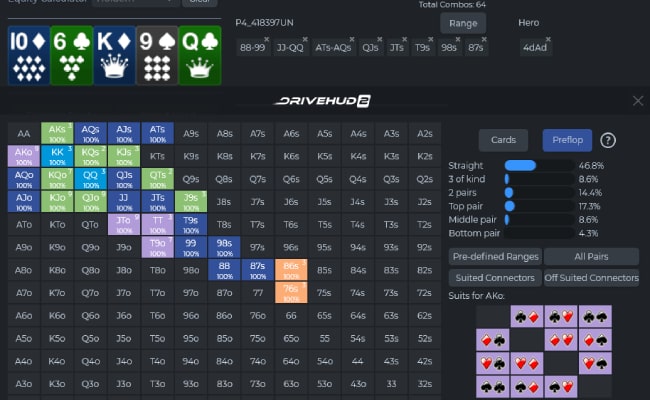
DriveHUD 2 is a poker database, HUD, and analytical software designed to track your online poker hands, store them in a structured database, and provide real-time information on your opponents during gameplay. The software imports hand histories from supported poker rooms, calculates essential statistics, and displays them on the table as a personalized HUD.
- Preflop range tools
- Game analysis dashboards
- Population tendencies
- Leak detection reports
- GTO-inspired analysis modules
- Built-in replayer
- Hand marking and review system
DriveHUD 2 is built to help players improve both tactically and strategically, offering deep insights into how different situations affect long-term win rates.
What DH2 does best
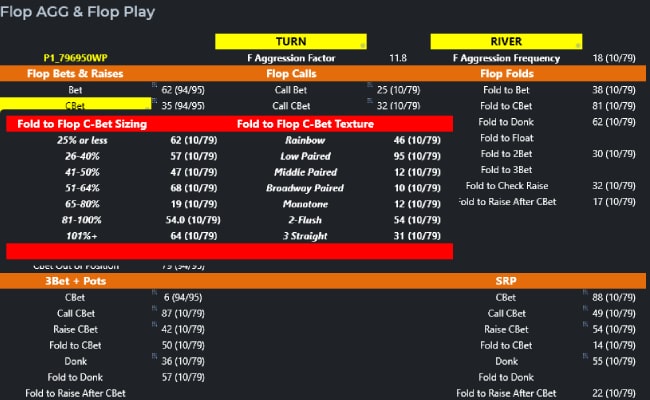
- Dynamic HUD & designer. Build good-looking HUDs quickly, with pop-ups and stat logic that feel modern at the table.
- Population & range reports. DH2 bakes in population tendencies and range-oriented reports that make exploit hunting easier.
- Leak Buster 2 integration. Leak Buster analyzes your DB against winning-player baselines and flags leaks—handy for structured improvement.
Platform & compatibility
Official docs say PC-only. Mac users can install Windows and run DH2 via Boot Camp. DH2’s site lists broad room coverage (PokerStars, WPN/ACR, iPoker/888, Ignition/Bodog, etc.), but compatibility can vary with client updates—always check their KB before a grind.
Workflow in practice
Import hands, attach the HUD, and track your session via the dashboard. Post-session, run Leak Buster 2 to get an “X-rayed” view of your stats, then open population/range reports to validate how your lines compare to common pool frequencies.
DriveHUD 2 Overall Rating
Pros
- Very intuitive and modern user interface
- Extremely easy for beginners to learn
- Advanced HUD editor with drag-and-drop customization
- Fast and stable database capable of handling millions of hands
- Native support for GGPoker
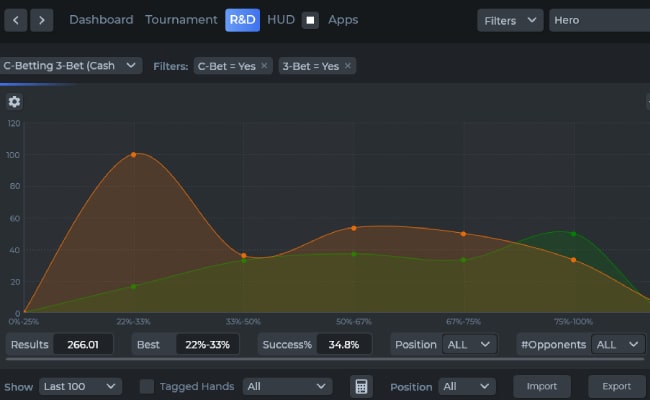
- Built-in range tools and post-flop analysis modules
- Strong population reports useful for strategy
- Clean graphical dashboard
- Excellent customer support and regular updates
- Affordable pricing with flexible license options
- Works with most major poker sites and networks
Cons
- More resource-heavy than older trackers on very outdated PCs
- Some advanced modules require additional purchases
- No native Mac version (requires bootcamp or virtual machine)
- Slightly more complex than the first version of DriveHUD
Who should choose DH2?
If you’re a visual learner or you want coaching cues built into your tracker, DH2 is a great fit—especially for multi-site PC grinders.
Quick Verdict
DriveHUD 2 strikes one of the best balances in the industry: advanced tools for serious players combined with a clean design that beginners can learn quickly. It is one of the most complete HUD and tracking solutions for modern online poker, especially because of its native GGPoker compatibility and advanced post-session analysis tools.
Players who want a long-term, modern poker tracker with a deep ecosystem of add-ons will find DriveHUD 2 superior to many older programs.

Security & Fairness
- Local encrypted database storage
- No sharing of player data with external parties
- Secure licensing
- Automatic updates without exposing user data
- No scraping or prohibited interaction with poker clients
All calculations and hand storage remain entirely on your device. There is no risk of cloud leaks, external access, or shared databases.
Is DriveHUD 2 Safe & Legit?
DriveHUD 2 is completely legitimate and safe to use. It was developed by Ace Poker Solutions, a long-established software development company in the poker industry. The tool relies solely on hand histories, which means it does not interact with poker clients in any prohibited way.
The program has no background memory-reading features and does not influence gameplay. It reads hands exported by poker sites, imports them locally, and uses them only on your device. Players remain fully compliant with standard poker site rules regarding third-party tools.
Overall Rating & Performance
- HUD customization
- Database speed and stability
- User experience
- Multi-site support
- Hand analysis
- Range tools
- Population data
- GTO-based calculations
It is one of the most complete programs for players who want a tracker that feels modern and offers more than just basic statistics.
Promotions & Bonuses
- Complete packages
- Upgrades from DriveHUD 1
- Combined Hold’em + Omaha bundles
- Seasonal offers
- Add-on modules
Promotions vary, but users typically receive long-term free updates and ongoing support regardless of the package chosen.
Game Selection Compatibility
- No-Limit Hold’em
- Pot-Limit Omaha
- Omaha 5
- Short Deck
- MTTs and SNGs
- Spin & Go / Jackpot formats
- Fast-fold formats
- GGPoker variants
- Mixed games (via external converters)
This flexibility is especially beneficial for players who play across multiple formats or want to experiment with newer games like 6+ Hold’em or PLO5.
Software & User Experience
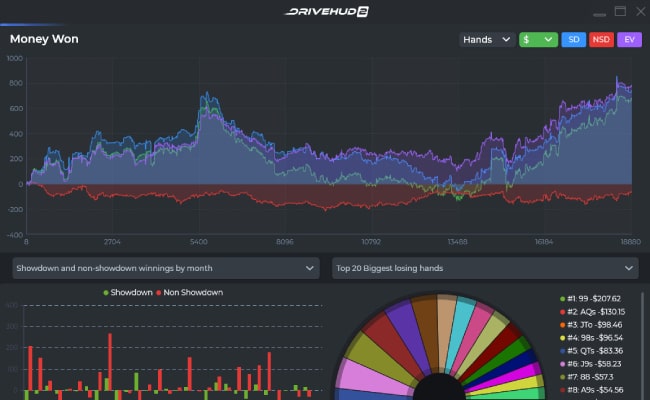
One of DriveHUD 2’s greatest strengths is its interface. The dashboard, graphs, and analytics sections are visually polished, easy to navigate, and designed with clarity in mind.
- Drag-and-drop HUD system
- Modernized range designer
- Heatmaps and distribution analyzers
- Instant filtering tools
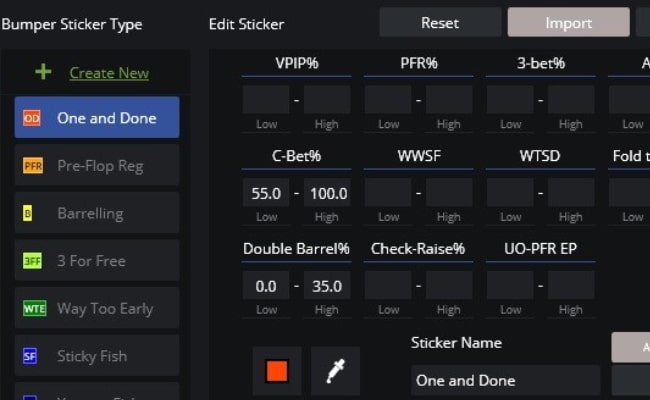
- Intuitive tagging system
- Smooth replayer with timeline controls
- Real-time session graph panel
Compared with older trackers, DriveHUD 2 requires much less time to learn. The software feels fluid, contemporary, and comfortably laid out, even during heavy multi-tabling sessions.

Traffic & Scheduling Insights
- Win rate by time of day
- Most profitable hours
- Session length impact
- Site-specific performance
- Tournament scheduling efficiency
These insights are extremely helpful for players grinding MTTs, SNGs, and cash games. Understanding when the pool is soft can translate directly into improved ROI and long-term results.
Rakeback & Rewards Tracking
- Rake paid across formats
- Net win rate after rake
- Rewards and cash drops
- EV adjustments
- Reward program impact on long-term ROI
This is especially important for networks like GGPoker where the rake structure is complex. DriveHUD 2 helps track your true earnings far more accurately than simple spreadsheet tracking.
Rake & Fees Analysis
- Rake by position
- Rake by effective stack depth
- Fast-fold rake contributions
- MTT fees
- True EV after all fees
These tools can reveal significant structural leaks, especially for players grinding mid- to high-rake environments.
Banking & Licensing
DriveHUD 2 is purchased through a one-time license with instant activation options.
- Hold’em license
- Omaha license
- Combined package
- HUD add-ons
- Asian App converter
- GTO modules
Supported payment methods typically include credit/debit cards, PayPal, Skrill, Neteller, Bitcoin, and additional local processors depending on your region.
Support & Operations
- A responsive helpdesk
- Live chat in peak hours
- An active community
- Continuous documentation updates
- Frequent patches and improvements
Feature requests and bug reports are addressed quickly, and updates are released more consistently than with many competing trackers.
Player Ecology Tools
- Common pool leaks
- Overfolding and overcalling patterns
- Positional tendencies
- Preflop and postflop frequency errors
- Strategy gaps in different stake levels
These tools allow players to build strategies that exploit typical patterns in their player pools, leading to more profitable adjustments in-game.

Comparisons
- Versus PokerTracker 4: Easier UI, more modern visuals, and native GGPoker support.
- Versus Hold’em Manager 3: More stable, smoother on most systems, cleaner HUD editor.
- Versus Hand2Note: More user-friendly, requires no complex configuration, and works on more sites.
- Versus solvers: Not a replacement, but highly effective when paired thanks to built-in analysis modules.
Overall, DriveHUD 2 offers one of the best blends of usability and depth.
Final Verdict
DriveHUD 2 is one of the strongest poker tracking and HUD tools available today. Its modern interface, advanced analytics, exceptional usability, and native GGPoker compatibility make it stand out among competitors. Whether you are a beginner learning statistical fundamentals or a professional grinder optimizing your strategy, DriveHUD 2 provides the tools necessary to understand your game deeply and improve consistently.
Its combination of range analysis, population data, detailed tracking, and customizable HUD options places it as one of the most well-rounded poker tools of the current generation. Players looking for a modern, powerful, and user-friendly tracker will find DriveHUD 2 to be an outstanding choice.